Radio App
RAFIKI APPS LLCMusic & Audio
4.4180.00 Reviews
- Version
- 1.2.0
- Installs
- 500.00K
- Age Rating
- Teen
Screenshots
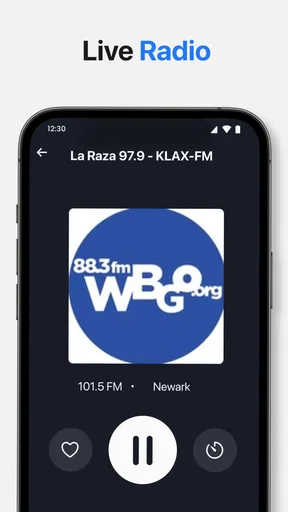
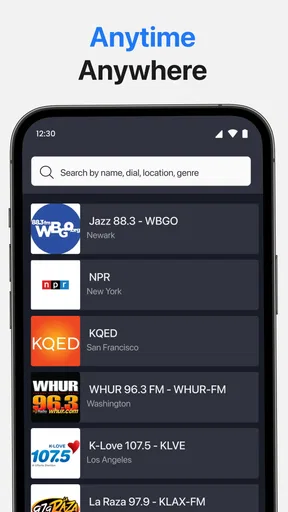
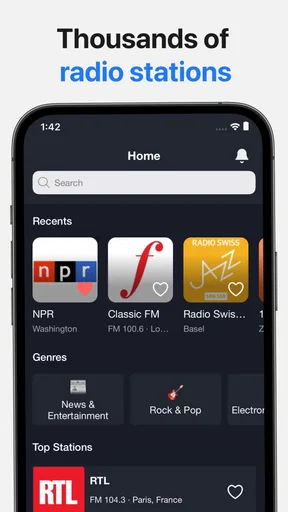
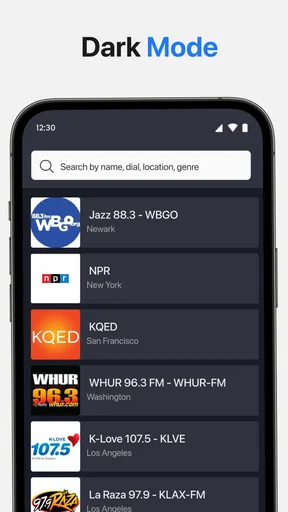
Our Review of Radio App
 Analysis by Appyee
I downloaded Radio App expecting a straightforward way to replace the separate FM, AM, and online radio tools I usually keep around. After using it across a few ordinary listening situations, I found that its biggest appeal is not a flashy interface or a huge collection of extras. It is the simple path from wanting live audio to actually hearing a station. That makes it especially useful when I want music, news, sports, or a local broadcast without choosing a podcast episode or building a playlist first.
Radio App is a free Music & Audio app from RAFIKI APPS LLC. It has reached over 100 thousand installs and holds a 4.5 average from around 1.3 thousand ratings, which suggests that its uncomplicated approach is working for many listeners. The app is rated Teen, runs on Android 6.0 and later, and the current version is 1.1.2. There are in-app purchases ranging from $2.99 to $24.99 per item, so I would still check the purchase screens carefully before confirming anything, even though the basic download is free.
From deciding what to hear to getting a live station playing
I found that the quickest way to make a live-radio app feel useful is to decide what the moment calls for before browsing: company, local updates, or a particular kind of programming. That small choice keeps me from scrolling without a purpose and makes it easier to judge whether a station is a good fit. Next, I’ll look at what changes when listening stretches beyond a quick check-in.
The starting condition: I wanted live audio, not another on-demand library
My usual problem is familiar: I have a few minutes in the kitchen, I am driving, or I want background sound while doing a routine task, but I do not want to spend time selecting an album. A music streaming service is excellent when I know the artist or mood I want. A podcast app is better when I want a particular subject. Neither feels quite as immediate as turning on a radio station and letting the programming decide what comes next.
That is where this app makes sense. Its focus is live radio rather than personal libraries, downloads, or elaborate recommendations. I can approach it with a broad intention—music during breakfast, news during a break, sports commentary while following a game, or a local station for familiar voices—and then browse toward a live broadcast. The useful change is that the decision happens at the station level, not track by track.
Before installing it, I would ask one practical question: do I need a specific station that I already know, or do I simply want access to radio categories? Radio App is more appealing in the second situation. If a particular broadcaster is essential to your routine, you should test whether it appears and plays reliably in your area before making it your only radio tool. For casual discovery and quick listening, the general purpose is much clearer.
The first step: opening the app and choosing a listening direction
The initial workflow is easy to understand because the app is built around the main radio decision. I open it, look for the kind of audio I want, and move toward a station rather than navigating through unrelated media sections. The broad mix of FM, AM, and online radio gives the app a wider role than a simple internet-only player, at least in concept: it is intended to bring different forms of live broadcasting into one place.
That variety can be helpful when my listening mood changes. In the morning, I may look for news. Later, I may want music without having to create a queue. During a sports event, a live station may be more useful than a written score because the broadcast provides commentary and context. The app’s value comes from making those changes feel like different destinations inside the same listening habit.
One tip I found useful is to begin with the purpose of the session, not with a long search. If I start by asking “What do I want from the next half hour?” I reach a suitable station faster than if I browse aimlessly. That matters on a phone, where too many taps can make a supposedly simple radio session feel slower than opening a familiar streaming service.
The station handoff: selecting a broadcast instead of selecting a song
The most important handoff is between browsing and playback. With an on-demand service, I choose a track and expect it to start immediately. With live radio, the station is the item I choose, and the stream becomes the outcome. That difference affects how I judge the app. I am less concerned with album art or a perfect queue and more concerned with whether I can identify a station, start it, and leave it playing without unnecessary decisions.
Radio App is at its best when I treat it as a live audio switchboard. I choose a station based on its format, start listening, and allow the broadcast to carry the session. This is a better fit for cleaning, commuting, cooking, or taking a short break than for focused music selection. If I want to hear three particular songs in a certain order, I would still use a conventional music streaming app.
There is also a subtle trade-off here. Live radio gives me surprise and continuity, but it removes some control. I may hear a song I would not have chosen, a news segment at an inconvenient moment, or advertising and station material as part of the broadcast. That is not a flaw unique to this app; it is the nature of radio. Still, anyone moving from a personalized streaming subscription should understand that Radio App does not turn live stations into an on-demand catalog.
Using different radio types for different everyday jobs
The FM and AM focus is useful for people who think in terms of traditional radio, while online live stations make the app relevant to listeners who are comfortable with internet broadcasting. In practice, I would use those options differently. A local station is the natural choice when I want regional news, familiar programming, or a nearby sports broadcast. An online station is more attractive when I want a style or program that is not part of my immediate local dial.
A realistic example is a weekday morning. I open the app while preparing breakfast, choose a news-oriented or local station, and let it run while I move around the room. When I leave, I can switch my attention to a music station if I want less spoken content. The outcome is not a carefully curated soundtrack; it is a continuous live feed that requires very little management.
For sports, I would use it when the important thing is live commentary rather than video. That can be more practical when I am walking, working around the house, or trying to save attention for another task. The limitation is equally important: audio radio is not a substitute for watching the action, and a station’s coverage may depend on what it broadcasts. I see this as a companion option, not a complete sports platform.
What happens after playback begins
Once the stream is playing, my role changes from searching to monitoring. I want to know that the selected station is still the one I intended, that the audio is understandable, and that I can return to browsing when the program changes. This is where a focused radio app has an advantage over a general audio platform: the whole session remains centered on live stations rather than encouraging me to jump into unrelated content.
My advice is to test a few stations before settling on one for a regular routine. A station that sounds right in the afternoon may not suit a morning commute, and a local news format may be useful on weekdays but less enjoyable during a relaxed weekend. Building a small mental shortlist is more effective than expecting the app to make every choice for you.
Another practical habit is to start the station before the moment you urgently need it. If I am about to leave the house or begin a task, I prefer to confirm playback while I still have time to switch stations. Live audio depends on the broadcast connection, and the extra moment prevents a minor loading or availability issue from interrupting the beginning of a commute or program.
The handoff between phone, routine, and attention
Radio App fits best when the phone is only the starting point and the listening continues in the background of another activity. I might begin a station at my desk, carry on with a household task, and return later to change the format. This workflow is different from actively browsing a music catalog, because the app is useful precisely when I do not want to keep looking at the screen.
That also creates a responsibility for the listener. Live audio can continue while I am no longer thinking about the app, so I would keep an eye on battery use and mobile data in situations where those resources matter. I am not treating this as a defect in Radio App; streaming live audio naturally requires a connection and ongoing playback. The sensible approach is to use it deliberately when away from a reliable network and avoid assuming that every station behaves like an offline file.
The app is also a better match for shared environments than a personal playlist in some cases. If I am cooking with someone else or working in a room where people have different tastes, a general station can provide a common background without forcing one person to manage every song. On the other hand, listeners who need silence between tracks, exact language control, or highly personal recommendations may find live radio less predictable.
Where the workflow breaks
The first possible break is station availability. Radio is not a single fixed library in the same way as downloaded music. A station may be more or less useful depending on location, broadcast rights, schedule, or the quality of its online feed. Because of that, I would not install the app expecting every familiar broadcaster to behave identically. The right test is simple: search for the stations that matter to you and listen long enough to decide whether they fit your routine.
The second break is the difference between “free” and completely cost-free use. The app itself is free to download, but in-app purchases are listed from $2.99 to $24.99 per item. That does not automatically make the app poor value, yet it does mean I would pay attention to what a purchase unlocks and whether I actually need it. For someone who only wants occasional live radio, the free experience may be enough; for a frequent listener, the decision depends on how the paid options affect the specific workflow.
The third break is expectation. The store short description is simply “Radio App,” and that plain identity is accurate in spirit: this is not trying to be a full music production tool, a podcast manager, or a social audio network. If you want synchronized lyrics, personal playlists, offline albums, or deep artist discovery, another category of app is likely a better choice. Installing this one will not remove the need for those tools.
I also would not choose it as my only emergency information source. A radio app can be convenient for news and local programming, but important alerts should come from official channels appropriate to your location. Radio App is a listening convenience, not a replacement for every communication service on a phone.
Who benefits most from this particular setup
I would recommend Radio App to someone who misses the low-effort habit of turning on a station. It is particularly suitable for listeners who move between music, news, sports, and local programming and would rather browse live broadcasts than maintain several separate apps. It also makes sense for people who enjoy discovery through programming instead of relying entirely on algorithmic recommendations.
The app may also suit households that want a simple shared audio option. One person can choose a station for the room, and everyone can let the broadcast run without negotiating a long playlist. That is a small but meaningful advantage: the station format can reduce the number of choices when the goal is simply to fill a space with live sound.
I would be more cautious about recommending it to someone with a strict, personal listening plan. If you need to replay favorite tracks, skip every unwanted song, download content for travel, or maintain precise control over what plays next, an on-demand music service is the stronger alternative. If your priority is spoken programs that you can pause and resume at any time, a podcast app will usually be more convenient.
How it compares with the usual alternatives
Compared with a traditional radio receiver, Radio App brings the convenience of a phone and combines FM, AM, and online live radio in one app-oriented experience. The receiver remains preferable when you want a dedicated device with no browsing distractions. The app is preferable when you already carry your phone and want to change between kinds of live programming in one place.
Compared with music streaming services, the advantage is immediacy and variety within a live broadcast. I do not need to decide on an artist, album, or playlist before hearing something. The disadvantage is control: I accept the station’s schedule, interruptions, and programming choices. This is a genuine trade-off rather than a feature gap that can be solved by tapping a different menu.
Compared with podcast platforms, Radio App is better for real-time flow and local or scheduled broadcasts. Podcasts are better when I want an episode on demand, reliable stopping points, and the ability to continue exactly where I left off. I would use both rather than force one tool to cover the other’s strengths.
My result after following the full workflow
From the starting need—“I want live audio now”—to the final result of having a station playing with minimal effort, Radio App follows a sensible path. The strongest part is the handoff from intention to station: I can think in terms of music, news, sports, or local listening rather than constructing a detailed media queue. That makes the app feel useful during ordinary moments when attention is limited.
Its weaknesses are tied to the same simplicity. It cannot give me the control of an on-demand music library, the pause-and-resume structure of podcasts, or the certainty that every station will be equally useful in every place and situation. I also keep the in-app purchase range in mind before spending money, because the free label should not encourage automatic purchases.
Overall, I would install Radio App if my goal were to bring several kinds of live radio into one Android app and make casual listening easier. RAFIKI APPS LLC has kept the central idea clear, and the current version, 1.1.2, is a reasonable starting point for anyone using Android 6.0 or later. Choose it for live discovery and low-effort listening, not for total control over every minute of audio. That distinction is what determines whether the app becomes a useful daily companion or simply another player I open once and forget.
Privacy and Permissions
See what permissions an app requests and how it handles your data.
- Wi-Fi connection information
- view Wi-Fi connections
- Other
- view network connections, full network access, control vibration, prevent device from sleeping, Google Play license check
Verdict
Strengths of Radio App
- Quick access to a wide variety of live radio stations
- Simple interface makes browsing and playback easy
- Supports background listening while using other apps
- Station search helps find channels by name or genre
- Useful for discovering international music and talk shows
Limitations of Radio App
- Audio quality depends heavily on your internet connection
- Some stations may be unavailable or stop streaming unexpectedly
- Advertising can interrupt the listening experience
- Battery and mobile data use may increase during long sessions
- The selection and features may vary between regions
Similar Picks in This Category
View All
YouTube Music
Google LLC4.4

Samsung Music
Samsung Electronics Co., Ltd.3.8

Spotify: Music and Podcasts
Spotify AB4.3

JioSaavn - Music & Podcasts
Saavn Media Limited4.3

Lark Player:Music Player & MP3
Lark Player Studio - Music, MP3 & Video Player4.6

StarMaker: Sing Karaoke Songs
SKYWORK AI PTE. LTD.4.3
Frequently Asked Questions
What is Radio App and what can I use it for?
Radio App is a mobile listening platform that lets you discover and stream radio stations from different locations and categories. After installing it, you can browse music, news, sports, talk, and entertainment stations, save favorites, and quickly return to channels you enjoy. Its usefulness depends on the available station catalog and the quality of your internet connection.
Does Radio App require an internet connection to work?
Yes, Radio App generally needs an active Wi-Fi or mobile data connection to stream live radio. Listening over mobile data may consume a considerable amount depending on how long you use the app, so Wi-Fi is recommended for extended sessions. Some versions may offer limited offline features, such as saved stations or recently played content, but live broadcasts normally cannot be played without internet access.
Can I listen to local and international radio stations?
Radio App is designed to provide access to a broad selection of stations, including local, national, and international broadcasts. Availability can vary by country, licensing agreements, and the app’s current station directory. In my experience, searching by station name, genre, or location is the easiest way to find specific content, although some stations may occasionally be unavailable or removed.
Does Radio App run in the background and support listening while using other apps?
In most cases, Radio App can continue playing audio while you browse other applications, lock your phone, or use compatible Bluetooth devices. This makes it practical for commuting, working, or relaxing without keeping the app open on screen. Background playback may be affected by battery-saving settings, system restrictions, unstable connections, or interruptions caused by incoming calls and notifications.
Is Radio App free, and are there advertisements or paid features?
Radio App may be available to download and use without an upfront charge, but free access can include advertising, sponsored content, or limitations on certain features. Depending on the version, an optional subscription or in-app purchase may remove advertisements or provide additional tools. Before downloading, check the store listing carefully for pricing, renewal terms, and any regional differences.
